

xTool Omni O1 UV Printer: Ink System & Smart Cycle 2.0 Maintenance Explained

xTool Omni O1 UV Printer: Ink System & Smart Cycle 2.0 Maintenance Explained
Availability Notice: The xTool Omni O1 UV Printer has not yet launched. Stay up to date on announcements and be the first to pre-order when it becomes available.
VISIT OUR xTool UV PRINTER PAGE
VISIT OUR xTool UV PRINTER PAGE

When people compare desktop UV printers, the first thing they usually look at is the machine price. But for long-term use, the bigger question is often this: How stable is the ink system, and how much effort does the printer require to keep running well?
For creators, small studios, and print businesses, ink is more than a consumable. It affects color consistency, print quality, nozzle reliability, maintenance frequency, and the real cost of every product you make. That's why the xTool Omni O1 UV Printer was designed with a closed cartridge ink system and Smart Cycle 2.0 — an intelligent maintenance system built to make UV and DT printing more stable, predictable, and easier to manage over time.
Why the Ink System Matters More Than Most People Think
UV printing is different from regular desktop printing. UV ink contains pigments, functional additives, and curing components that must work precisely with the printer's fluid path, printhead waveform, curing system, and maintenance cycle. If the ink is not stable, problems may not appear immediately — but over time users may experience:
Print Quality Issues
Color shifts between prints
Inconsistent white ink output
Banding, edge blur, or satellite drops
Operational Costs
More frequent cleaning cycles
Clogged nozzles or blocked tubing
Higher maintenance waste
Shorter printhead life
For small businesses, these aren't just technical inconveniences. They can affect order quality, delivery speed, customer satisfaction, and profit margin. That's why the xTool Omni O1 UV Printer's ink and maintenance system is designed as one integrated workflow — not as separate parts you need to manage manually.
Closed Cartridge Ink System
Many desktop UV printers use open ink systems where users refill tanks or bottles manually. The xTool Omni O1 UV Printer uses a closed cartridge ink system instead. This design choice is about stability, compatibility, and long-term reliability — not just convenience.
| Factor | Open Ink System | xTool Omni O1 Closed Cartridge |
|---|---|---|
| Air Exposure | Ink exposed during refilling — accelerates oxidation | Sealed until installation — no air exposure |
| Contamination Risk | Mixing different inks can cause incompatibilities | Factory-sealed, consistent batch quality |
| Print Quality | Switching brands may shift color output | Co-optimized with ICC profiles and jetting waveform |
| Maintenance Compat. | Unknown settling may conflict with stirring systems | Formulated for O1's stirring + circulation workflow |
| Long-Term Cost | Unpredictable — printhead damage is expensive | Predictable — formulated to protect O1's printhead |
Non-Reprotoxic Ink — A Safety Factor Worth Knowing
Many desktop UV users print in home studios, garages, small workshops, retail spaces, or shared work environments — very different from industrial print shops with dedicated ventilation. xTool Omni O1 ink is formulated to be non-reprotoxic, meaning it's designed without ingredients classified for reproductive toxicity.
✓ Home studio friendly
✓ Shared workspace appropriate
✓ Suitable for daily use
✓ Non-reprotoxic classification
Proper ventilation and responsible operation are always recommended when using any UV printing system.
Why Third-Party Ink Can Cost More Than It Saves
Third-party UV ink is easy to find online and often appears cheaper per ml. But UV ink is not a generic liquid that can be swapped without consequences — it has to match the printer's color profiles, printhead waveform, fluid path, curing behavior, and maintenance system. The xTool Omni O1 UV Printer does not support third-party inks for these reasons:
⚠️ ICC Profile Mismatch
Color profiles calibrated for xTool ink's pigment concentration
Third-party inks may produce unexpected color shifts
Extra time adjusting files or reprinting failed jobs
⚠️ Waveform Incompatibility
Waveforms tuned to specific ink viscosity and surface tension
Incompatible ink causes banding, satellite drops, edge blur
Often accelerates nozzle wear
⚠️ White Ink Instability
O1's white ink matched to its stirring + circulation system
Third-party white may have different particle size and settling rate
Maintenance system may not protect the ink path as intended
⚠️ Warranty & Repair Risk
Non-xTool ink may affect warranty on printhead issues
Printhead is one of the most expensive parts to replace
Apparent savings can be wiped out by one repair event
Smart Cycle 2.0: Automated Maintenance for Long-Term Reliability
Hybrid printing usually means hybrid maintenance headaches. When one machine supports UV and DT workflows, users might expect more cleaning, more switching procedures, and more chances for something to go wrong. The xTool Omni O1 UV Printer is designed differently.
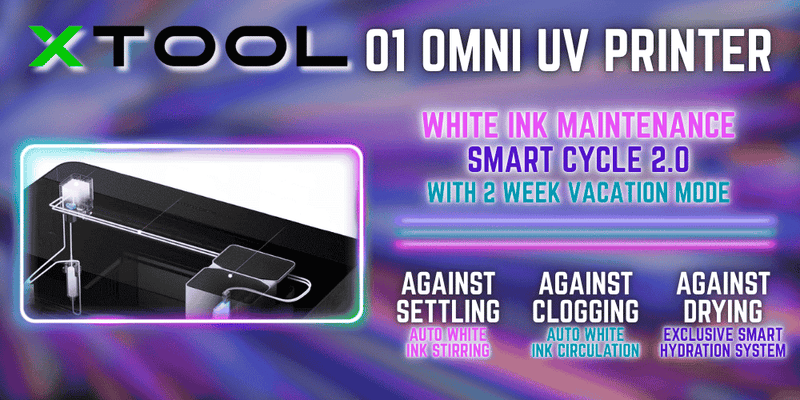
Smart Cycle 2.0 is xTool's intelligent maintenance system built on apparel printer experience and adapted for UV and DT printing. Instead of requiring users to manually manage ink condition, temperature, circulation, humidity, and idle-time protection, Smart Cycle 2.0 automates maintenance at the system level — built around five key innovations:
1. White Ink Stirring + Active Circulation
White ink naturally settles over time. Many printers only stir ink inside the cartridge — which helps inside the container but doesn't address sediment buildup in the tubing or printhead path.
The xTool Omni O1 UV Printer combines white ink stirring with active circulation through the entire fluid path, helping keep pigment more evenly suspended and reducing settling-related startup issues even after extended idle time.
| Feature | Stirring Only | xTool O1: Stirring + Active Circulation |
|---|---|---|
| Where it works | Mainly inside the ink container | Ink container and full fluid path |
| Tubing protection | Limited | Helps reduce settling in the ink line |
| After idle periods | Often requires more cleaning | Designed to reduce pre-print maintenance burden |
| User benefit | Partial white ink management | More stable white ink workflow over time |
2. Industrial Ceramic Heating Module
When the environment is too cold, ink viscosity increases — affecting ink flow, droplet formation, color consistency, and nozzle performance. The ceramic heating module keeps ink at its optimal working temperature automatically:
- UV ink: approximately 30°C
- DT ink: approximately 25°C
- Faster thermal response than conventional heating
- More stable output in garages, basements & cold studios
3. Vacation Mode with Moisturizing Liquid
Long idle periods are one of the biggest maintenance challenges in UV and DT printing. When ink stays in the printhead too long, pigment may settle around the nozzles — increasing clogging risk and making wake-up harder.
O1's Vacation Mode uses a dedicated moisturizing liquid and a self-developed integrated maintenance damper to protect the printhead during downtime. Unlike external valve-based designs, the shorter integrated fluid path reduces residual liquid, unnecessary flushing, and waste during idle protection.

4. Humidity Sensor + App Monitoring
Humidity can affect maintenance needs — a printer in a dry environment may require different protection than one in a more stable workspace. The xTool Omni O1 UV Printer includes a built-in humidity sensor that adjusts maintenance cycles based on ambient conditions, and the xTool app provides real-time monitoring with ink level alerts and machine anomaly reminders — so you can catch small issues before they become production interruptions.
5. Multiple Cleaning Modes
Not every maintenance scenario needs the same cleaning intensity. The xTool Omni O1 UV Printer provides structured cleaning modes so you can choose the right level for each situation:
| Mode | What It Does | When to Use |
|---|---|---|
| Standard Clean | Routine nozzle maintenance | Before a print session or after a short idle period |
| Deep Clean | Stronger nozzle purge | After extended idle time or when a clog is suspected |
| Sleep | Prepares printhead before idle protection | Before entering Vacation Mode |
| Wake Up | Flushes protection fluid, restores ink flow | When returning from Vacation Mode |
What Smart Cycle 2.0 Means for Your Business
The goal of Smart Cycle 2.0 is not to eliminate maintenance entirely — UV and DT printing still require responsible operation and basic care. The real goal is to make maintenance more predictable and less dependent on constant manual attention.
🎨 For Creators
Less anxiety when the machine sits idle
Fewer manual steps before printing
More stable white ink performance
Better printhead protection during downtime
Fewer surprises from temperature or humidity changes
🏢 For Small Businesses
More reliable order fulfillment
Less wasted time on troubleshooting
More predictable operating costs
Lower risk of production interruptions
Greater confidence offering printed products to customers
Frequently Asked Questions
Smart Cycle 2.0 is xTool's intelligent maintenance system developed from Apparel Printer experience. It combines white ink stirring + active circulation, ceramic temperature control, Vacation Mode with moisturizing liquid, a self-developed integrated maintenance damper, and a humidity sensor — all working together to reduce ink consumption and extend printhead life.
No. To ensure print quality and protect the printhead, the xTool Omni O1 UV Printer does not support third-party inks. Using non-xTool ink may affect warranty coverage and can cause ICC profile mismatches, waveform incompatibility, and white ink instability that leads to costly repairs.
xTool Omni O1 ink is classified as non-reprotoxic under applicable standards, making it suitable for use in enclosed indoor environments such as home studios and shared workspaces. Proper ventilation is always recommended during use.
Vacation Mode automatically protects the printhead during extended idle periods by switching to moisturizing liquid instead of leaving pigment-heavy ink in the nozzle path. When you return, Wake Up mode flushes the protection fluid and restores normal ink flow — reducing clog risk and minimizing startup waste.
The closed cartridge system prevents air exposure, contamination from ink mixing, and batch inconsistencies. It also ensures the ink is co-optimized with O1's ICC profiles, jetting waveform, and Smart Cycle 2.0 maintenance system — providing a more stable, predictable printing experience over time.
Check Out Our Other xTool Omni O1 Blog Posts

🚨 More Coverage Is Coming — Stay Tuned
We're publishing ongoing deep-dives into the xTool Omni O1 UV Printer as launch approaches. Bookmark this page and check back for print tests, workflow guides, and bundle comparisons.